Digital Transformation
Enterprise Resource Planning (ERP): The Complete Guide to Streamlining Business Operations
Enterprise-Resource-Planning-(ERP)-The-omplete Guide-to-Streamlining-Business-Operations-Chanakya-Consulting-Growth-Technology-Strategy-Automation-Intelligence
As businesses grow, managing multiple departments with separate software solutions becomes increasingly complex. Finance uses one system, sales another, inventory is managed elsewhere, and human resources often operates independently. This lack of integration creates data silos, duplicate work, delayed reporting, and inefficient decision-making.
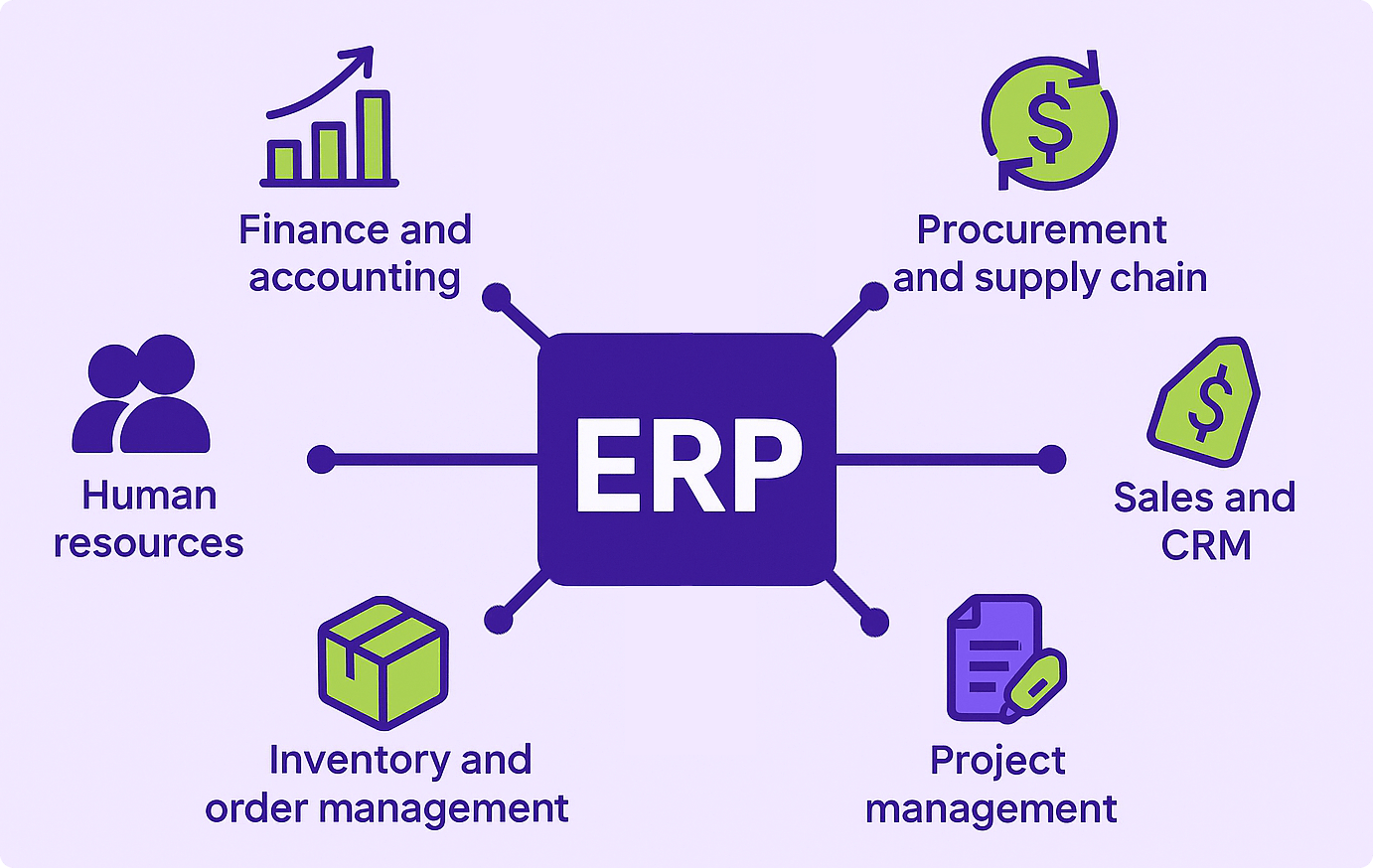
Enterprise Resource Planning (ERP) solves this challenge by bringing every critical business function together into a single integrated platform. From accounting and procurement to inventory, manufacturing, customer management, and human resources, ERP provides organizations with one reliable source of truth for their business operations.
Whether you’re a small business planning for growth or a large enterprise seeking operational excellence, an ERP system helps improve productivity, reduce costs, enhance collaboration, and support data-driven decision-making.
What is Enterprise Resource Planning (ERP)?
Enterprise Resource Planning (ERP) is a centralized business management system that integrates finance, human resources, inventory, procurement, sales, manufacturing, and customer data into a single platform. By implementing Enterprise Resource Planning, organizations can streamline operations, improve collaboration, reduce costs, and make data-driven decisions.
An ERP system collects data from every department, stores it in a centralized database, and provides real-time visibility across the organization. This enables employees and executives to make informed decisions using accurate and up-to-date information.
“An ERP system connects people, processes, and data—creating a single source of truth for the entire business.”
Why ERP Matters
Modern businesses need accurate information and seamless collaboration to remain competitive. ERP systems eliminate fragmented workflows by integrating departments, improving communication, and automating business processes.
Centralized Information
Store business data in one centralized database that is accessible across departments.
Operational Efficiency
Reduce manual work, eliminate duplicate data entry, and automate routine business processes.
Better Collaboration
Enable departments to work together using shared data and standardized workflows.
Improved Decision-Making
Access real-time dashboards and reports that support faster and more accurate business decisions.
How an ERP System Works
ERP software integrates business operations through a centralized database where every department contributes and accesses the same information. Updates made by one department become instantly available across the organization.
1. Data Collection
Business information is collected from finance, HR, procurement, manufacturing, inventory, CRM, sales, and operations.
2. Centralized Database
All data is stored in a unified database, eliminating duplicate records and maintaining consistency.
3. Department Integration
Information flows automatically between departments, improving communication and collaboration.
4. Real-Time Reporting
Managers access dashboards and reports that provide current business performance metrics.
5. Business Decisions
Executives use real-time insights to improve planning, optimize resources, reduce costs, and support growth.
Core Modules of an ERP System
ERP platforms are built using modules that support different business functions. Organizations can implement the modules they need while maintaining a single integrated system.
Finance & Accounting
Manage accounts payable, accounts receivable, general ledger, budgeting, taxation, and financial reporting.
Human Resources
Handle recruitment, payroll, attendance, employee records, performance management, and training.
Inventory Management
Track stock levels, warehouse operations, inventory valuation, procurement, and order fulfillment.
Sales & CRM
Manage customer relationships, quotations, orders, invoicing, and sales performance.
Procurement
Automate purchasing processes, vendor management, approvals, and supplier performance tracking.
Manufacturing
Plan production schedules, manage bills of materials, monitor production, and improve quality control.
Key Benefits of Enterprise Resource Planning
| Benefit | Business Impact |
|---|---|
| Centralized Data | Provides one reliable source of truth across the organization. |
| Higher Productivity | Automates repetitive tasks and reduces manual work. |
| Improved Collaboration | Departments work together using shared information. |
| Cost Reduction | Minimizes operational inefficiencies and duplicate processes. |
| Better Decision-Making | Real-time dashboards provide actionable business insights. |
Types of ERP Systems
Modern ERP solutions are available in different deployment models to meet the needs of organizations of every size. The right ERP system depends on business goals, budget, security requirements, industry regulations, and scalability needs.
Cloud ERP
Cloud ERP is hosted by a service provider and accessed through the internet. It offers automatic updates, lower infrastructure costs, and easy scalability.
- Subscription-based pricing
- Remote accessibility
- Automatic software updates
- Quick deployment
- High scalability
On-Premise ERP
On-premise ERP is installed and maintained on the organization’s own servers, offering greater control over infrastructure and data.
- Full system control
- Higher initial investment
- Custom security policies
- Internal maintenance
- Suitable for regulated industries
Hybrid ERP
Hybrid ERP combines cloud and on-premise environments, allowing businesses to balance flexibility, security, and operational requirements.
- Flexible deployment
- Gradual cloud migration
- Improved disaster recovery
- Enhanced scalability
- Balanced infrastructure
Cloud ERP vs On-Premise ERP
Selecting the right deployment model depends on business size, budget, compliance requirements, IT capabilities, and long-term growth plans.
| Feature | Cloud ERP | On-Premise ERP |
|---|---|---|
| Deployment | Hosted by vendor | Installed internally |
| Upfront Cost | Lower | Higher |
| Maintenance | Vendor managed | Managed by internal IT |
| Accessibility | Anywhere with internet | Usually internal network |
| Scalability | Very High | Depends on infrastructure |
ERP vs CRM vs SCM
ERP, CRM, and SCM systems often work together but each focuses on a different area of business operations.
| System | Primary Focus | Typical Users |
|---|---|---|
| ERP | Entire business operations | All departments |
| CRM | Customer relationships & sales | Sales & marketing teams |
| SCM | Supply chain management | Operations & logistics |
ERP Implementation Roadmap
ERP implementation is a strategic initiative that requires planning, stakeholder involvement, and continuous monitoring to ensure long-term success.
Step 1: Define Business Objectives
Identify operational challenges, performance goals, and expected business outcomes before selecting an ERP solution.
Step 2: Select the Right ERP Platform
Evaluate ERP vendors based on functionality, scalability, industry expertise, integration capabilities, and total cost of ownership.
Step 3: Clean & Migrate Data
Prepare accurate and consistent business data before migrating it into the new ERP environment.
Step 4: Configure Business Processes
Customize workflows, approval processes, user roles, reports, and dashboards according to business requirements.
Step 5: Test the System
Conduct functional testing, integration testing, user acceptance testing (UAT), and security validation before deployment.
Step 6: Train Employees
Provide hands-on training to improve user adoption and reduce resistance to organizational change.
Step 7: Go Live & Monitor
Deploy the ERP system, monitor system performance, resolve issues quickly, and gather user feedback.
Common ERP Implementation Challenges
Poor Change Management
Employees may resist adopting new systems without effective communication and training.
Data Migration Issues
Incomplete or inaccurate data can reduce the effectiveness of the ERP implementation.
Budget Overruns
Unexpected customization, training, and implementation costs can impact project success.
Lack of Executive Support
Strong leadership is essential to drive adoption and ensure project alignment with business goals.
ERP Best Practices
- Align ERP implementation with strategic business objectives.
- Standardize business processes before customization.
- Maintain high-quality master data.
- Involve stakeholders from every department.
- Provide ongoing employee training and support.
- Monitor KPIs continuously after deployment.
- Perform regular software updates and security audits.
- Continuously optimize workflows as business needs evolve.
Before vs. After ERP Implementation
Implementing an Enterprise Resource Planning (ERP) system transforms how organizations operate. By integrating business functions into one centralized platform, ERP eliminates inefficiencies and provides real-time visibility across the organization.
Before ERP
- Multiple disconnected software systems
- Manual data entry across departments
- Duplicate and inconsistent information
- Slow reporting and decision-making
- Limited collaboration between teams
- Inventory inaccuracies
- High operational costs
- Difficult compliance and auditing
After ERP
- Single integrated business platform
- Automated workflows
- Real-time business data
- Faster reporting and analytics
- Improved cross-functional collaboration
- Optimized inventory management
- Lower operating costs
- Enhanced regulatory compliance
ERP Use Cases Across Industries
Enterprise Resource Planning systems are highly adaptable and support organizations across various industries by streamlining operations and improving productivity.
Manufacturing
- Production planning
- Material requirement planning
- Quality management
- Inventory optimization
- Equipment maintenance
Retail & E-commerce
- Inventory tracking
- Order management
- Point-of-sale integration
- Demand forecasting
- Customer management
Healthcare
- Hospital resource planning
- Procurement management
- Financial reporting
- Compliance management
- Asset tracking
Financial Services
- Budget management
- Financial planning
- Risk management
- Regulatory compliance
- Audit reporting
Professional Services
- Project management
- Time tracking
- Billing automation
- Resource planning
- Profitability analysis
Education
- Student administration
- Finance management
- HR and payroll
- Asset management
- Reporting dashboards
Essential ERP Key Performance Indicators (KPIs)
Tracking ERP performance ensures organizations maximize their investment while continuously improving business operations.
| KPI | Purpose |
|---|---|
| Inventory Turnover | Measures inventory efficiency. |
| Order Fulfillment Time | Tracks delivery speed. |
| Financial Close Time | Measures accounting efficiency. |
| System Adoption Rate | Evaluates employee usage. |
| Procurement Cycle Time | Measures purchasing efficiency. |
| Operational Cost Reduction | Evaluates overall ERP business impact. |
Future Trends in Enterprise Resource Planning
ERP technology continues to evolve with artificial intelligence, cloud computing, automation, and advanced analytics, enabling businesses to become more agile and data-driven.
AI-Powered ERP
Artificial Intelligence automates repetitive tasks, predicts trends, and provides intelligent recommendations.
Cloud-First ERP
Businesses increasingly adopt cloud ERP to improve scalability, accessibility, and operational flexibility.
Predictive Analytics
Organizations use predictive models to forecast demand, optimize inventory, and reduce business risks.
Low-Code Customization
Low-code development enables businesses to customize ERP workflows with minimal programming.
Frequently Asked Questions (FAQs)
What is the primary purpose of an ERP system?
An ERP system integrates business functions such as finance, HR, sales, procurement, inventory, and operations into one centralized platform, improving efficiency and decision-making.
Who should use ERP software?
Organizations of all sizes can benefit from ERP software, especially businesses managing multiple departments, complex operations, or rapid growth.
Is ERP suitable for small businesses?
Yes. Modern cloud-based ERP solutions offer affordable pricing and scalable features specifically designed for small and medium-sized businesses.
How long does ERP implementation take?
Implementation timelines vary depending on business size, complexity, customization, and data migration. Projects can range from a few months to over a year.
What are the biggest ERP implementation risks?
Common risks include poor planning, inadequate training, low user adoption, inaccurate data migration, and insufficient executive support.
Conclusion
Enterprise Resource Planning is far more than software—it is a strategic business platform that integrates people, processes, and technology into a single ecosystem. By eliminating information silos and automating core operations, ERP enables organizations to increase productivity, improve collaboration, reduce operational costs, and make faster, data-driven decisions.
As businesses continue to embrace digital transformation, ERP systems have become essential for sustainable growth, operational excellence, and long-term competitiveness. Investing in the right ERP solution today prepares your organization for tomorrow’s challenges and opportunities.
A well-implemented ERP system doesn’t just manage your business—it helps your business grow smarter.
Transform Your Business with ERP Consulting
At Chanakya Consulting, we help organizations successfully plan, implement, optimize, and modernize Enterprise Resource Planning solutions. Our consulting experts align technology with business strategy to improve operational efficiency, increase productivity, and accelerate digital transformation.
Published by Chanakya Consulting — Helping organizations achieve operational excellence through Enterprise Resource Planning (ERP), Digital Transformation, Business Intelligence, AI, Process Optimization, and Strategic Business Consulting.
SAP ERP